LiveWell with Advocate Aurora
- 4.4
- Rating
- 1.00M
- Installs
- Free
- Price

 Analysis by App-foxy
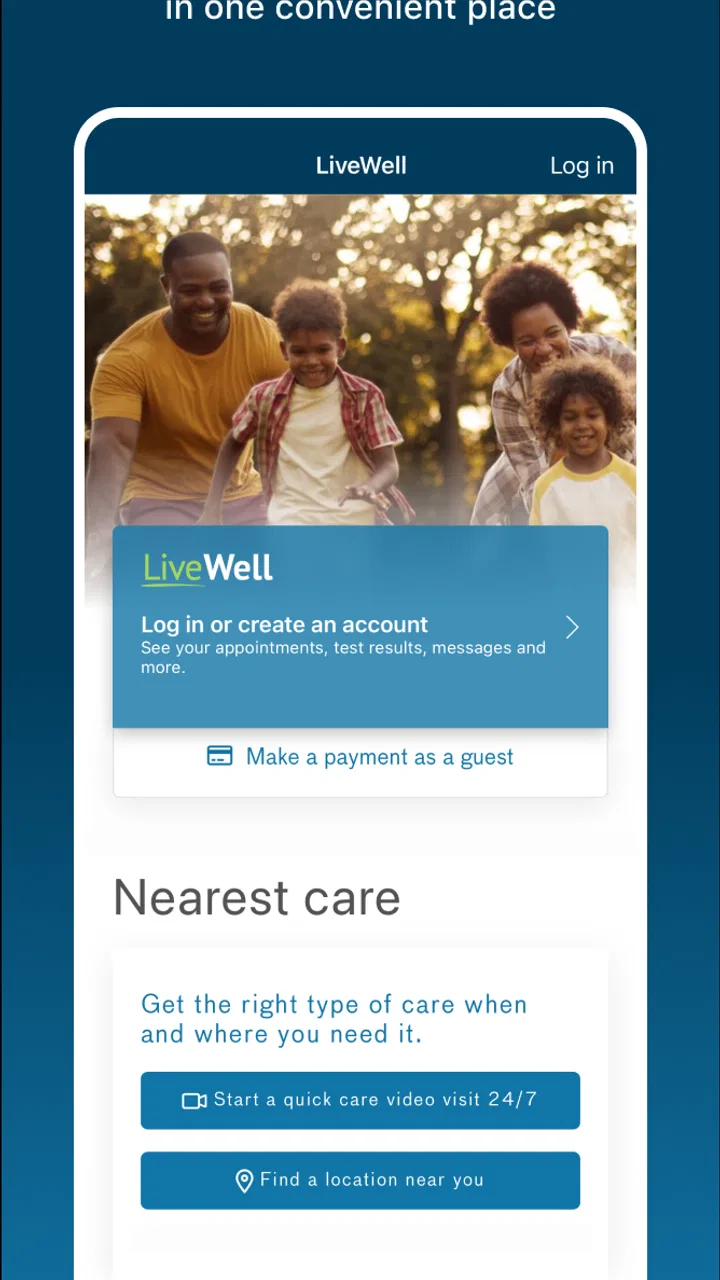
Choosing a health app is less about finding the one with the longest feature list and more about finding the one that matches the way you already receive care. LiveWell with Advocate Aurora is a medical app from Advocate Aurora Health that brings health information into one place. I found it most useful as a companion for people who already use this health system, rather than as a general wellness tracker for anyone looking for exercise plans, nutrition coaching, or a broad collection of self-care tools.
That distinction matters. A health-system app can save time when you need to check care-related details, while a standalone wellness app may be better for building habits that are not tied to a particular provider. LiveWell sits firmly on the care-management side of that choice. It is free, rated for Everyone, and available for Android and iOS devices that meet its operating-system requirement. I would think of it as a practical doorway into your relationship with Advocate Aurora Health, not as a replacement for medical advice or urgent care.
How I would decide whether LiveWell fits
My first decision criterion would be whether Advocate Aurora Health is part of your normal care routine. If it is, having one app for health information can be much more convenient than moving between paper instructions, browser pages, phone calls, and separate reminders. If you receive care elsewhere, the app becomes a much less obvious choice because its value is connected to that health network.
You May Also Like

 Blood Strike: 2.5 Anniversary
Blood Strike’s Loadouts Turn Every Drop Into a Tactical Gamble
A close look at Blood Strike’s custom loadouts: how fast access to signature weapons reshapes its battle royale rhythm, rewards preparation, and narrows the gap between fights.

 Pandora - Music & Podcasts
Pandora’s Music Is Easy to Start, but Harder to Recover
Pandora’s strength is its low-effort path from a seed to a station. Its weak spot is how much confidence it asks you to place in connection, setup, and quiet recovery.

 8 Ball Pool
 Is Built on Rivalries, Rematches, and Routine
A close look at the rivalries, rematches, shared routines, and unanswered safety questions that turn a quick pool match into a persistent mobile community.

 Samsung Music
’s Quiet Strength Is Playing What You Already Own
Its reach comes less from spectacle than from dependable access to a personal library. That simplicity is both the app’s strongest retention engine and its ceiling.

 AccuWeather: Weather Radar
AccuWeather Review: A Quick, Clear Forecast for Everyday Decisions
For everyday plans, the best forecast is the one you can understand quickly. AccuWeather makes rain timing, radar, and local conditions easy to act on, with a few trade-offs.

 Hill Climb Racing
Why Hill Climb Racing Still Turns Crashes Into One More Run
A tiny car, a bumpy hill and one more upgrade: Hill Climb Racing keeps resurfacing because its simple chaos makes every near-miss feel personal.
More From Our News Desk
View All News


The second criterion is the kind of task you want to complete. Someone who wants to review information connected with appointments, communicate through an established care channel, or keep an eye on personal medical details is looking for something different from a person who wants step counting, guided meditation, meal logging, or workout programs. LiveWell makes more sense for the first group. I would not install it expecting a complete lifestyle coaching platform.
The third question is how often you need access. An app like this earns its place when it removes small obstacles during real situations: preparing for a visit, checking information after an appointment, or trying to remember what was discussed while arranging the next step. If you only visit a provider occasionally and prefer handling everything by phone, the benefit may feel modest. The app is most convincing when it becomes part of an ongoing care routine.
I would also consider who needs to use it. The Everyone age rating makes it broadly suitable from a content perspective, but health information is personal, so the practical decision is about the individual’s comfort with managing that information digitally. A parent coordinating care, an adult helping a family member, and a patient managing their own appointments may all have different needs. I would check the account and access arrangements carefully before relying on it for another person’s care.
Finally, I would separate convenience from urgency. LiveWell can help organize ordinary healthcare tasks, but an app should never be the plan for an emergency. If a situation feels urgent or dangerous, I would use the appropriate emergency service or direct clinical contact instead of waiting for an app screen, message, or update.
What using it feels like in everyday life
A realistic example is the week before a scheduled visit. I might open LiveWell to review the information already connected with my care, check what I need to remember, and make a short list of questions before arriving. Afterward, I could return to the app instead of searching through old messages or trying to reconstruct the conversation from memory. The advantage is not dramatic technology; it is having a familiar place to begin.
Another useful situation is a busy household. If one person is trying to keep track of several appointments or care-related details, a centralized health app can reduce the mental load. I would still keep important instructions in the form provided by the clinician and follow those instructions exactly, but the app can serve as a convenient reference point. That is a more realistic benefit than expecting it to solve every organizational problem.
For someone who travels between work, home, and appointments, mobile access can also be more practical than relying on a desktop browser. I like the idea of being able to check health information at the moment it becomes relevant, rather than postponing the task until I remember a website login. The trade-off is that mobile convenience depends on a stable account, a working device, and the user being comfortable with the app’s sign-in process.
Where LiveWell is strongest
The biggest strength is focus. LiveWell is built around the relationship between a patient and Advocate Aurora Health, so it has a clearer purpose than many general health apps. Instead of mixing exercise challenges, advertisements, lifestyle content, and unrelated tracking tools, it is aimed at helping users access their health information in a more organized way.
That focus can make the app easier to justify for an existing patient. I do not need a health-system app to entertain me or motivate me to compete with friends. I need it to reduce friction around care. When an app stays close to that job, even simple actions can feel valuable because they happen in the right context.
There is also a trust advantage in using the app associated with the organization providing your care. That does not mean I would stop checking details or asking questions, but it does mean the app belongs to a recognizable care pathway rather than being a separate service that I must mentally connect to my provider. For many users, that continuity is more useful than a larger collection of generic health tools.
Its reception suggests that many users find the overall approach worthwhile: LiveWell holds a 4.5 average from around 17 thousand ratings, with more than 500 thousand installs. I see those figures as signs of an established app rather than proof that every experience will be smooth. Health apps are especially sensitive to account setup, device compatibility, and the exact needs of each patient, so I would treat popularity as reassurance, not a guarantee.
Small workflows that make it more useful
One habit I recommend is opening the app before a visit, not only after one. Preparing questions while the details are fresh can make a short appointment more productive. I would write down concerns in plain language, identify anything that has changed since the previous visit, and use the app as the starting point for reviewing relevant information. This turns it from a passive record into part of the preparation process.
A second habit is checking information at a calm moment and saving the important next step in my own routine. For example, after reviewing a care update, I might add a personal reminder to call, schedule, or discuss something. The app can centralize information, but I would not assume that reading something automatically creates a complete follow-up system. Pairing the app with the calendar or reminder method I already trust is a sensible compromise.
A third insight is that convenience depends on keeping account access manageable. I would avoid waiting until I am standing outside a clinic to discover that I cannot remember my sign-in details. Setting up access when I have time, keeping the device updated, and knowing how I normally recover access can prevent a simple administrative problem from becoming a stressful part of a medical visit.
I would also use the app as a prompt for better conversations, not as a substitute for them. If a detail looks confusing or does not match what I remember, the right response is to ask the care team for clarification. Digital information is helpful when it improves communication; it becomes unhelpful when a user treats a screen as a diagnosis or interprets a detail without context.
Where another category may fit better
LiveWell is not the best choice for every health goal. If my main objective were daily activity tracking, a fitness-focused app or a wearable platform would probably offer a more suitable experience. Those products are designed around repeated measurements, trends, goals, and motivation. I would choose them when the center of my routine is exercise rather than provider-based care.
For food planning, sleep routines, meditation, or behavior change, a dedicated wellness app may also be more appropriate. These categories usually depend on coaching, habit loops, content libraries, or detailed personal logging. LiveWell’s medical focus is an advantage when I need care information, but that same focus means it should not be judged as though it were a lifestyle coach.
A web portal may be preferable for users who do a lot of administrative work at a desk or who find a larger screen easier to navigate. I generally prefer a mobile app for quick checks, but a browser can feel more comfortable when I need to read carefully, compare information, or type a longer message. The best option may be to use the app for immediate access and the web experience when a larger workspace is more practical, if both are available through the same care relationship.
Some users may also prefer speaking with staff directly. That is not a failure of LiveWell; it is a personal workflow choice. If a question is complicated, emotionally difficult, or time-sensitive, a phone conversation may provide more clarity than a digital exchange. I would choose the app for routine access and organization, while reserving direct contact for matters where context and immediate interaction matter more.
The app may be a poor fit for someone who does not use Advocate Aurora Health or who wants one tool to combine many unrelated health services. It is also not the right answer for emergency decisions, diagnosis, or replacing a clinician’s judgment. Knowing those boundaries prevents disappointment and helps users compare it fairly with general-purpose alternatives.
What switching actually involves
Moving to LiveWell is free, which removes one common barrier to trying a healthcare app. The more meaningful cost is not money; it is setup time and habit change. I would need to establish access, become familiar with where information appears, and decide how the app fits alongside my calendar, reminders, email, and any other health tools I already use.
That switching cost is low for a patient who currently manages everything through scattered notes and occasional browser visits. In that situation, a dedicated mobile entry point can simplify the routine quickly. The cost is higher for someone who already has a carefully organized system and rarely needs provider-related information. For that person, another app may add one more place to check without delivering enough extra convenience.
I would not transfer every health habit into LiveWell just because it is available. Instead, I would give it one clear job first: accessing and organizing information related to Advocate Aurora Health. After using it for ordinary care tasks, I could decide whether it genuinely saves time. This gradual approach is better than attempting to replace a fitness tracker, medication routine, calendar, and provider communication method all at once.
Version 11.6.4 shows that the app is maintained as a current product, while its history reaches back to its release on March 9, 2015. For me, that combination suggests an established service that has had time to develop, but it also means I would keep expectations realistic: a mature medical app may prioritize dependable access and care workflows over flashy design experiments. It requires Android 11 or later, so device age is one practical compatibility check to make before planning around it.
Privacy and access habits deserve attention during the switch. I would use a secure device lock, avoid sharing the account casually, and sign out or protect the device when other people regularly handle it. These are not reasons to avoid the app; they are sensible steps whenever personal medical information is available from a phone.
My recommendation for different users
I recommend LiveWell with Advocate Aurora most strongly to people who already receive care from Advocate Aurora Health and want a convenient mobile place to manage health information. It is especially appealing to patients who prefer handling routine tasks digitally, people who prepare carefully for appointments, and families trying to reduce the amount of paper and scattered reminders involved in ordinary care.
I would recommend trying it before adding another general health app. Because it is free, the decision can be based on usefulness rather than a subscription commitment. Give it a defined role, use it around a real appointment or care task, and notice whether it reduces searching, repeated calls, or forgotten follow-ups. That is a better test than judging it by how many lifestyle features it lacks.
I would steer someone toward a different category if their main goal is fitness progress, sleep analysis, nutrition tracking, meditation, or broad wellness coaching. I would also suggest direct contact with a healthcare professional when the question is urgent, complex, or difficult to interpret without context. LiveWell works best as part of care, not as the entire care plan.
Overall, I see LiveWell with Advocate Aurora as a practical medical companion with a clear audience. Its most important benefit is not novelty but connection: it puts Advocate Aurora Health-related information closer to the patient’s everyday routine. The app is free, available to a broad age group, and supported by a substantial user base, but its real value depends on whether that health system is already part of your life.
My final advice is simple: if Advocate Aurora Health is your provider, install it and test it during a normal, non-urgent healthcare task. If it helps you prepare, review, and follow through with less effort, it has earned a permanent place on your phone. If you want a complete personal wellness dashboard or do not use this care network, choose a tool designed for that purpose instead. The right choice is the one that fits your actual healthcare workflow, not the one with the broadest promise.
FAQs for LiveWell with Advocate Aurora
01What is LiveWell with Advocate Aurora, and what can I do with it?
LiveWell with Advocate Aurora is a comprehensive health management app designed to help users manage their medical information, schedule appointments, and communicate with healthcare providers. The app also allows users to access their medical records, refill prescriptions, and receive personalized health tips, making it a convenient tool for managing your health and wellness.
02Is LiveWell with Advocate Aurora available for both Android and iOS devices?
Yes, LiveWell with Advocate Aurora is available for download on both Android and iOS devices. Users can find the app on the Google Play Store for Android and the Apple App Store for iOS. This ensures accessibility for a wide range of users, helping them keep track of their health across different platforms.
03How secure is my personal health information on the LiveWell app?
The LiveWell app prioritizes user privacy and security by employing advanced encryption methods to protect personal health information. Users can rest assured that their data is safeguarded in compliance with HIPAA regulations, ensuring that sensitive information remains confidential and secure within the app.
04Can I use LiveWell to schedule appointments with any healthcare provider?
LiveWell allows you to schedule appointments with healthcare providers within the Advocate Aurora Health network. This feature streamlines the process of booking appointments, providing users with an easy way to manage their healthcare needs without the hassle of phone calls or long wait times.
05Does LiveWell offer any tools for tracking my health and wellness goals?
Yes, LiveWell provides various tools for tracking your health and wellness goals. These include features for monitoring physical activity, diet, and other health metrics. Additionally, the app can offer personalized health tips and reminders to support your journey towards achieving a healthier lifestyle.
Pros
- User-friendly interface for easy navigation.
- Comprehensive health tracking features.
- Seamless integration with wearables.
- Access to a wide range of wellness resources.
- Customizable notifications for reminders.
Cons
- Limited functionality without internet access.
- Some features require in-app purchases.
- Occasional syncing issues reported.
- Limited language support available.
- Initial setup can be time-consuming.

LiveWell with Advocate Aurora
Gallery